
Find a song
Type in the search box and the results appear as you type. A song opened from Search, Browse or History lands in the same Song pane.
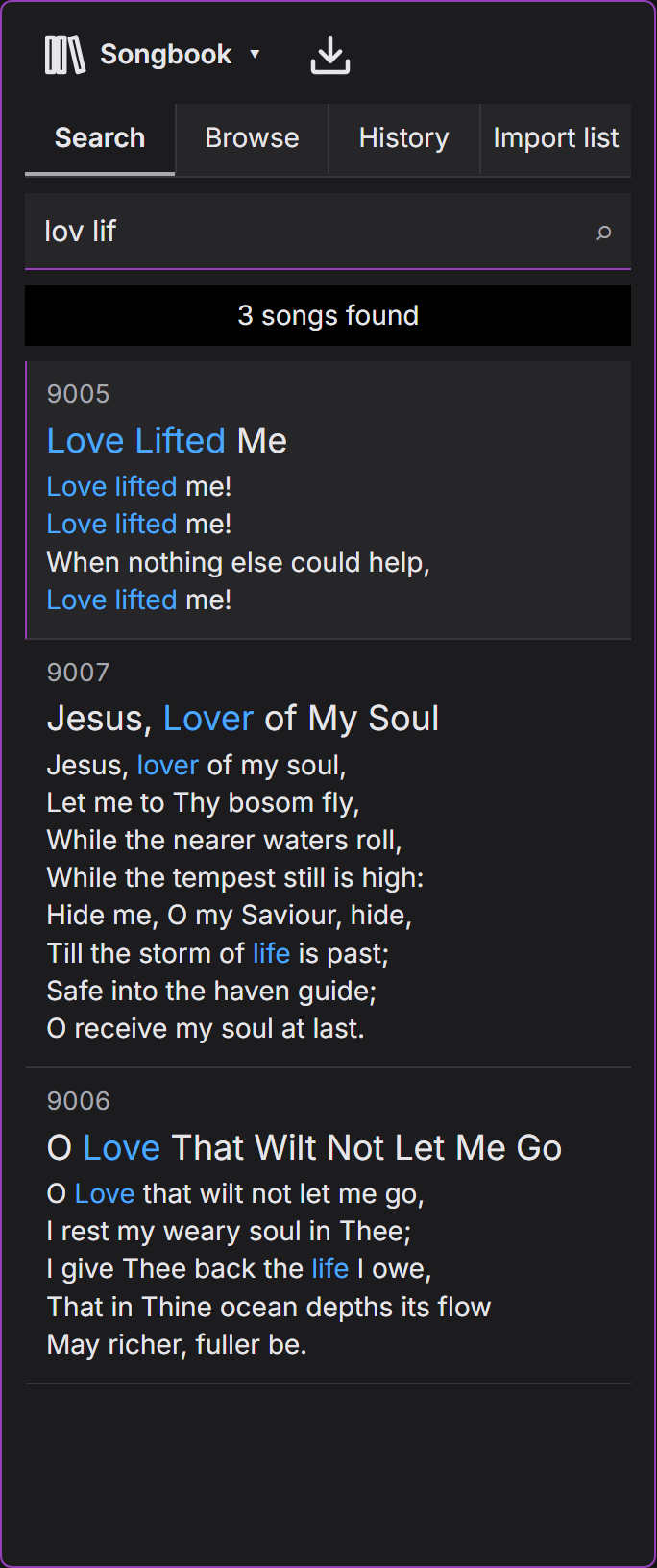
Search (Ctrl+1)
- Type a song number, part of a title, or a few words of the lyrics. Parts of words work too: lov lif finds Love Lifted Me.
- Press Enter or ↓ to move into the results. ↑/↓ show each song in the Song pane.
- Press Enter on the one you want. It opens on the stanza that matched, with your words highlighted, and the Song pane becomes active.
With the mouse, one click shows a result and a double-click opens it.
Browse (Ctrl+2)
Browse lists every song.
- Type in the filter box to narrow the list by title or number.
- Keys ▾ shows only songs in the keys you tick. Clear empties both filters.
- Click Title, Number or Last modified to sort. Click again to reverse.
History (Ctrl+3)
History lists the songs shown live for at least 10 seconds, grouped by day, newest first. Its filter box works like the one in Browse.
In Browse and History, Esc goes from the list back to the filter box. Esc again clears the filter.
Moving between tabs
Ctrl+1 to Ctrl+4 open Search, Browse, History and the Import list. With the Library active, Ctrl+Tab moves to the next tab.