
Edit a song and its history
The song editor opens in the Song pane. Whatever is on the projector stays there while you edit.
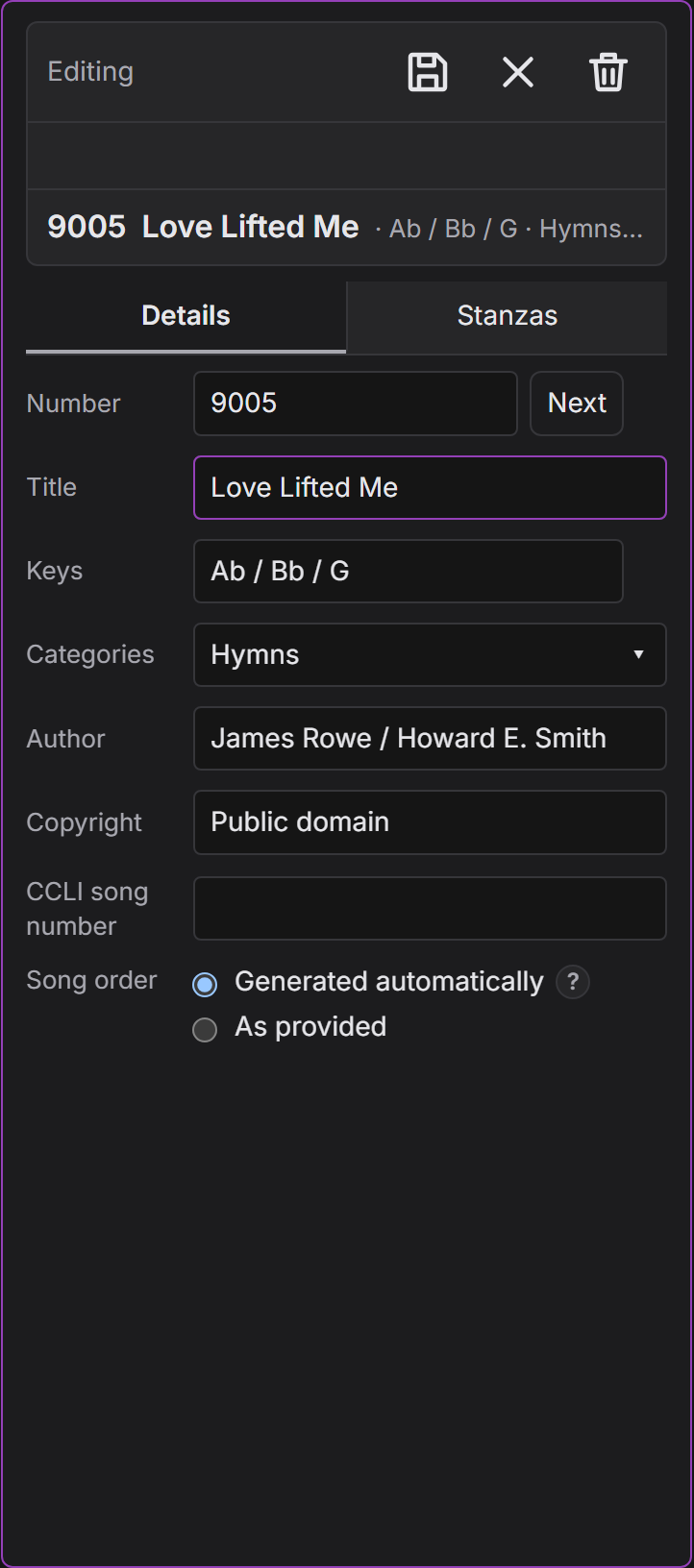
Add or edit a song
- Add a song: click New song in the Song pane header, or press Ctrl+N. The next song number is already filled in.
- Edit a song: open it, then click Edit or press Ctrl+E.
The editor has two tabs. Ctrl+Tab switches between them.
| Tab | What goes there |
|---|---|
| Details | Number (Next gives the next free number), Title, Keys, Categories, Author, Copyright, CCLI song number and Song order. |
| Stanzas | Every stanza in one box, with a blank line between stanzas. |
Write the stanzas
- Start a stanza with its title on its own line: Verse 2, Chorus, Bridge, Pre-Chorus, Intro or Ending. A stanza with no title is a verse.
- For a title of your own, start it with *, as in *Vamp. The * is not shown.
- A title on its own line, with no words under it, sings that stanza again there.
- Lines break only where you press Enter. The app never wraps a line for you.
- Song order is Generated automatically (the chorus comes after each verse) or As provided (exactly as written).
Keys go in one short box, separated by slashes. A range is written with a dash: F - Ab / Bb.
Save
- Click Save or press Ctrl+S.
- If something is wrong, nothing is saved. Each problem shows in red under its field, and a ⚠ marks the tab that holds it.
- Fix them and save again. ✓ Ready to save shows when all is well.
Cancel (Esc) asks before dropping unsaved changes.
The editor holds lyrics only. If a song has chords, the editor warns that saving will remove them.
Delete a song
Click Delete or press Ctrl+Del. The app asks first. A song that is live can't be deleted: end live mode first.
Earlier versions
Every save keeps the song as it was, and deleting a song keeps its last version too. Nothing you save is ever lost. The app doesn't show earlier versions.
History of songs shown live
The History tab (Ctrl+3) lists the songs shown live for at least 10 seconds, grouped by day. See Find a song.